Court Rally Pro Tennis Match
Reviews
Court Rally Pro Tennis Match delivers simplified tennis in a browser, with horizontal racket movement and power-ups that alter ball size, speed, and bounce. The single-player mode offers an adaptive opponent for practice, while local two-player turns any device into a head-to-head arcade. Bright 2D visuals and touch or mouse controls keep it accessible. The main limitation is the lack of online play and the short match format, which may not satisfy players seeking deeper simulation.
Description
Match Flow and Core Rules
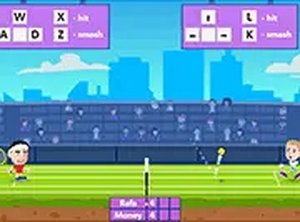
Court Rally Pro Tennis Match condenses a tennis match into a short, browser-based session. You control a racket that moves horizontally along your side of the court, intercepting the ball and sending it back over the net. Points are earned by landing the ball on the opponent's side. The first player to reach the target score wins the set, and matches are designed to stay brief enough for a quick break.
Power-Ups and Their Effects
During a rally, special items appear on the court. Grabbing one temporarily changes how the ball behaves. The ball might grow larger, making it easier to return, or shrink, turning it into a smaller target. Some power-ups speed the ball up dramatically, while others add spin or cause unpredictable bounces. These items create a small strategic layer: you can chase a power-up or hold your position for the next shot. The choice affects the rhythm of the rally.
Single-Player Practice Mode
The single-player mode pits you against a computer-controlled opponent that adjusts to your skill level. The AI returns shots with consistent timing, which helps you refine reflexes and court coverage. This mode is useful for warming up before a multiplayer session or for players who prefer solo play. The computer opponent does not use power-ups, so the focus stays on fundamental rally skills.
Local Two-Player Competition
In two-player mode, both players share the same screen, each controlling a racket on opposite sides of the court. This turns any device into a mini arcade for head-to-head matches. Friends and family can compete without an internet connection or extra hardware. Quick rematches are supported, making it suitable for casual tournaments at home or on the go.
Visual Style and Accessibility
The game uses bright, clean 2D graphics with clear court lines and player icons. The interface is minimal, showing only the score and active power-up indicators. Controls work with mouse clicks or touch taps, so it runs smoothly on desktops, tablets, and phones. Because it loads directly in a web browser, there is no installation process or account creation required.






Editorial Notes