Yes That Dress! Coloring Fashion Game
Creative Dress Up Coloring Fashion Casual Kids Family Art
Yes That Dress! Coloring Fashion Game
119
Developer: Killer Pixel Games
Published: 1753891200
Updated: 2026-09-30

Reviews

Yes That Dress! focuses on a simple creative loop: color a dress with at least two shades, add optional decorations, and submit for audience feedback. The daily rotation of characters and dresses keeps the content from feeling static, while browser-based play removes installation barriers. It is best suited to children and players who enjoy low-pressure fashion design. The main limitation is that scoring depends on subjective audience reactions rather than clear technical targets, so improvement comes from experimentation rather than following a fixed strategy.

Description

Core Coloring Mechanics

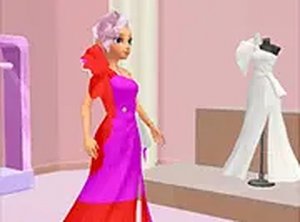
Each session in Yes That Dress! starts with a character and a dress outline. You choose colors from a palette and apply them by clicking or tapping specific areas of the dress. The game requires two or more shades per design, which encourages layered color combinations rather than flat fills. After coloring, you can add patterns or accessories to refine the look before submitting it for audience feedback.

Scoring and Audience Feedback

Submissions are judged by an in-game audience that responds with likes and thumbs up. The number of positive reactions depends on how harmonious and creative your color choices appear. This creates a clear loop: experiment with shades, decorate, submit, and see how your design performs. Because feedback is immediate, you can adjust your approach and try new combinations in the next round.

Daily Content and Accessibility

The game introduces new characters and dresses each day, so the available outlines change regularly. It runs in a browser on both mobile and desktop devices with no download required, and a full-screen mode is available for a more focused view. Controls are limited to tapping or clicking, which keeps the experience accessible for younger players and anyone looking for a low-pressure creative activity.


Editorial Notes

Compatibility

• OS: Windows 10+, macOS 11+, iOS 14+, Android 10+
• Browsers: Chrome 100+, Safari 15+, Edge 100+, Firefox 100+
• Not compatible with Internet Explorer
Tested on real devices ✅ works as expected

Faq

Does Yes That Dress! require any downloads or installations?
No. The game runs directly in a web browser on both mobile and desktop devices. You do not need to install an app or download any files. A full-screen mode is available if you want a larger, more focused workspace while coloring.
How does the scoring system work in Yes That Dress!?
After you submit a finished dress design, the in-game audience responds with likes and thumbs up. The number of positive reactions is based on how creative and harmonious your color combinations are. Using two or more shades and adding decorations can improve your results.
Can I play Yes That Dress! with my children?
Yes. The game is designed for kids and families, with simple tap or click controls and a family-friendly environment. There is no complex menu system or reading requirement, so younger players can participate with minimal assistance. The creative focus makes it suitable for shared play or independent use.
What happens if I don't like my design before submitting?
You can continue adjusting colors, patterns, and accessories until you are satisfied. The game only submits your design when you choose to do so. Taking time to experiment with different shade combinations is part of the process and can lead to better audience feedback.
Are there new dresses and characters available over time?
Yes. The game offers daily new characters and dresses to style, which means the available outlines change regularly. This provides fresh content each day and encourages players to return and try different color approaches on new designs.
What kind of device works best for Yes That Dress!?
The game works in a browser on both mobile and desktop devices, so either format is supported. Mobile devices use tap controls, while desktop uses click controls. Full-screen mode is available on both, which can make coloring more precise on smaller screens.