Castle Runner: Side-Scrolling Hero
Reviews
Castle Runner keeps its focus on timing and observation rather than complex combos. The mix of static spikes, falling rocks, and patrolling enemies creates levels that reward careful planning. Early stages teach the basics, while later ones demand quicker reactions. The colorful art and browser-based controls make it accessible on desktop and mobile. It is best suited for players who enjoy short, skill-based platforming sessions without downloads or installations.
Description
Reaching the Castle
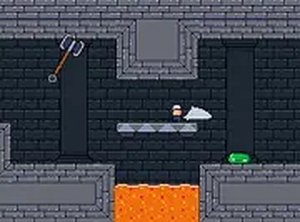
Each level in Castle Runner has one goal: move your character from the starting point to the castle at the far end. The route is rarely a straight line. You will jump across platforms, time your leaps over spikes, and avoid rocks that fall without warning. Enemies patrol set paths and block your way, so you either jump over them or land on them from above. The controls are simple—move left or right and jump—but the timing of each jump matters more than any combo.
Obstacles and Enemy Patterns
Levels mix static hazards with moving threats. Spikes can appear on the ground or on walls, so a safe jump in one spot may be deadly a few steps later. Falling rocks add unpredictability and force you to keep watching the screen. Enemies follow fixed patrol routes, which means you can learn their timing and plan a safe approach. As you progress, the game arranges these elements more tightly, asking for quicker reactions and better sequencing of jumps.
Difficulty and Progression
Early stages work as a tutorial. They teach basic movement and jump timing without much pressure. Later levels combine multiple hazard types in the same stretch, so you need to plan several moves ahead. The difficulty rises gradually, which keeps the game engaging without becoming frustrating. Every level ends at a castle, giving you a clear finish line and a sense of accomplishment before the next challenge begins.
Coins, Power-Ups, and Presentation
Coins and power-ups are scattered throughout each level. Coins add to your score, while power-ups can temporarily boost your speed or give you a protective shield. These items are optional, but they can make tough sections easier. Their placement often rewards you for stepping off the main path. The art style is colorful and friendly, with clear visuals that make obstacles and enemies easy to identify. The game runs entirely in a web browser, supports keyboard and touch controls, and includes a full-screen mode for desktop, tablet, or phone.




Editorial Notes