Geometry Jump Bit by Bit
Reviews
Geometry Jump Bit by Bit targets players who find fixed-speed jumpers too rigid. The ability to select 0.2x, 0.5x, 1x, or 2x before a run turns every section into adjustable practice, which is genuinely useful for learning obstacle patterns. The one-tap control and bright geometric visuals keep it approachable. The limitation is that the core loop is simple: jump, retry, adjust speed. Players wanting more than timing-based obstacle clearing may find it thin.
Description
Speed Selection as the Core Mechanic
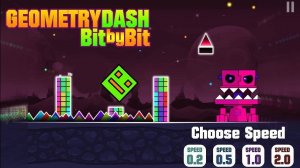
Most endless-style jumpers lock you into a single scrolling rate. Geometry Jump Bit by Bit does the opposite. Before a run begins, you choose a section from the menu, then tap one of four speed buttons: 0.2x, 0.5x, 1x, or 2x. That single decision reshapes the entire level. At 0.2x, obstacles drift toward you slowly enough to study their spacing and plan each tap. At 2x, the same layout demands quick reactions and precise timing. Because the speed is set before you start jumping, each attempt becomes a deliberate practice run or a self-imposed challenge rather than a fixed test. [IMG_1]
How a Run Plays Out
Your only action is a tap (or click) to jump. The geometric character moves forward automatically once the level loads, and your job is to clear every barrier and gap without collision. Reach the end of the section and the run is complete. There is no combat, no resource management, and no complex input combinations — just timing. That simplicity is what makes the speed slider meaningful: when a jump keeps failing at 1x, dropping to 0.5x lets you isolate the problem, then returning to full speed confirms whether you have actually learned the pattern.
Visual Style and Session Length
Bright geometric visuals keep the screen readable at every speed. Obstacles stay visually distinct from the background, which matters most at 2x when reaction time shrinks. The game suits short breaks because a single section can be finished in under a minute, but the speed options also support longer sessions for players who want to grind a specific layout until it feels automatic. [IMG_2]
Who Gets the Most From It
Beginners benefit from the slowest settings, which turn an otherwise punishing genre into something approachable. Experienced players can skip straight to 2x for a genuine reflex test. Anyone who has bounced off fixed-speed jumpers because of one brutal section may find the adjustable pace removes that frustration entirely.








Editorial Notes