Sphere Dash Path Navigator
Reviews
Sphere Dash Path Navigator succeeds by stripping away unnecessary complexity. The steady speed and one-axis movement keep the focus on route planning, while the constant tension between green and red gates creates meaningful decisions. The gradual difficulty curve and lack of a timer make it welcoming for families and casual players. Its main limitation is that the core loop may feel repetitive for those seeking deeper progression systems.
Description
Track Layout and Gate Decisions
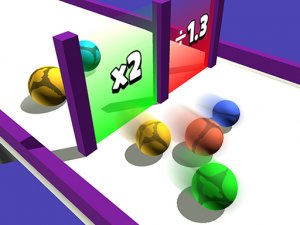
Sphere Dash Path Navigator places players in control of a growing group of spheres rolling along elevated, multi-lane tracks. Each run generates a fresh arrangement of green and red gates. Green gates add to the sphere count; red gates subtract from it. The central decision is path selection: which lane to take to collect the most green gates while avoiding red ones. Tracks include sharp turns, narrow sections, and branching routes, so the layout demands constant attention and quick adjustments.
Controls and Movement Feel
Input is deliberately simple. On a keyboard, the arrow keys or WASD move the sphere group left or right. On touchscreens, swiping or tapping either side of the screen produces the same lateral movement. There is no acceleration or braking; the spheres travel at a steady pace. This removes speed management from the equation and keeps the focus on navigation. The response time is tight, so each input feels precise and directly connected to the on-screen action.
Progression and Difficulty Curve
Early tracks are straight with a few gates, giving newcomers room to learn the basics. Later stages introduce multiple lanes that merge and split, forcing players to commit to a route before seeing all the gates ahead. Speed stays constant, but the complexity of the track increases the mental load. Each successful run unlocks the next track, providing a clear sense of forward momentum. The gradual ramp-up keeps the game accessible while still offering a meaningful challenge for those seeking to improve their scores.
Visual Style and Atmosphere
The game presents a clean, colorful 3D world. Tracks float in a bright, abstract space with simple geometric backgrounds. Spheres have a glossy finish, and their movement creates a smooth, flowing visual effect. Color coding is used throughout: green for beneficial gates, red for harmful ones, and neutral tones for the track surface. This clarity helps players process information quickly. The overall aesthetic is cheerful and non-threatening, making it suitable for younger players while remaining visually appealing to adults.
Scoring and Replay Value
Scoring is straightforward: each sphere that crosses the finish line adds to the final tally. The more spheres you have, the higher your score. This creates a natural incentive to take risks by steering toward green gates, even when they are placed near red ones. Players can replay tracks to try for a better score, and the game may track personal bests for each level. The combination of simple rules and varied track layouts encourages repeated play. There is no time limit, so players can take a moment to survey the track before making their move, reducing frustration and promoting thoughtful play.







Editorial Notes