Creative Character Designer
Character Creator Dress Up Arcade Hypercasual Kids Creative No Pressure
Creative Character Designer
79
Developer: Ember Veil Interactive
Published: 1742313600
Updated: 2026-10-01

Reviews

Creative Character Designer works because it removes almost everything that usually complicates a game. There is no timer, no score, and no way to lose, so the entire session is about choosing hair, eyes, clothes, and accessories until the character looks right. The click-and-drag controls are simple enough for young children, and the finished poster gives each attempt a visible result. It is best suited to kids who enjoy drawing or dress-up activities rather than players looking for challenges or progression systems.

Description

A Blank Canvas and a Set of Parts

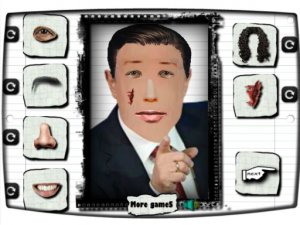
Creative Character Designer opens with an empty character template rather than a preset figure. From there, the player selects categories such as hair, eyes, nose, mouth, clothes, and accessories. Clicking a category swaps the current feature for another option, so building a character is a sequence of small choices rather than a single decision. The starting point is deliberately unfinished, which keeps the focus on assembling a look instead of reacting to a challenge.

Click, Swap, and Drag to Adjust

The controls are built around two actions. Clicking cycles through available features within a category. Dragging repositions elements after they are placed, which matters most for accessories that need to sit correctly on the face or body. Because there is no timer or score, players can revisit any category and keep changing it until the character looks right. The interface is colorful and uses on-screen options rather than typed input, which keeps the activity accessible to young children.

From Template to Finished Poster

When the character is complete, the game presents it as a poster that can be viewed and shared. This final step gives the session a clear endpoint without turning it into a competition. There is no win state, no failure state, and no penalty for experimenting. The poster format also explains why placement matters: a character meant to be shown as a finished image benefits from tidier accessory positioning.

Why the Format Suits Young Players

The combination of no time limit, no scoring, and simple click-and-drag controls makes the game a low-pressure creative activity rather than a test of skill. The content is limited to appearance customization, with no weapons or inappropriate material. Sessions can be short or long depending on how many combinations a player wants to try, and each finished character can be different from the last.
Editorial Notes

Compatibility

▸ Desktop: Chrome / Edge / Firefox / Safari
▸ Mobile: iOS Safari / Android Chrome
▸ Tablet: iPadOS Safari / Android Tablet Browser
Keep your browser updated for the best experience

Faq

Does Creative Character Designer have a time limit or score?
No. The game has no timer and no scoring system. Players can spend as long as they want on each category and change any feature after placing it. This design removes pressure and lets young children work at their own pace without worrying about losing or running out of time.
What customization options are available in Creative Character Designer?
Players can adjust hair, eyes, nose, mouth, clothes, and accessories. Each category offers multiple choices that can be mixed freely. The exact number of options per category is not specified, but the variety is enough to produce many different character combinations across repeated sessions.
Can I move accessories after placing them on the character?
Yes. The game supports dragging, so elements can be repositioned after they are added. This is especially useful for accessories that need to align with the face or body. Adjusting placement is optional, but it helps produce a cleaner final poster when the character is finished.
Is Creative Character Designer safe for young children?
The game is designed for children and focuses on appearance customization. There is no violence, no weapons, and no inappropriate content. The interface uses simple on-screen options, and the activity has no chat or competitive elements. Parents looking for a quiet creative task can consider it suitable for supervised or independent play.
Can I share the character I create?
After finishing a character, the game displays it as a poster that can be viewed and shared. The input does not specify which sharing methods are supported, so the exact options depend on the version you are playing. The poster view itself gives players a clear final image to show to friends or family.
Does Creative Character Designer require any special skills or reading ability?
No special skills are needed. The controls rely on clicking and dragging rather than typing or reading long instructions. Category labels and visual icons guide the process, which makes the game approachable for young children who may not read fluently. Adults can also use it as a simple creative break.